Welcome to HomeClaw
HomeClaw is an AI assistant that runs on your own hardware. Talk to it over the channels you already use—Telegram, Discord, WebChat, email, and more—or use the Flutter companion app (Mac, Windows, iPhone, Android) for chat, voice, and Manage Core (edit config from the app). Extend it with built-in and external plugins (any language: Node.js, Go, Java, Python, etc.) and OpenClaw-style skills. Memory is RAG + agent memory (AGENT_MEMORY.md, daily memory). Use cloud models (OpenAI, Gemini, DeepSeek, etc.) or local models (llama.cpp, GGUF), or both together for better capability and cost. Multimodal (images, audio, video) works with both. Multi-agent = run multiple HomeClaw instances. Your data stays yours.
System overview and data flow
System overview: all modules

Data flow: how a message is handled and where the LLM is used
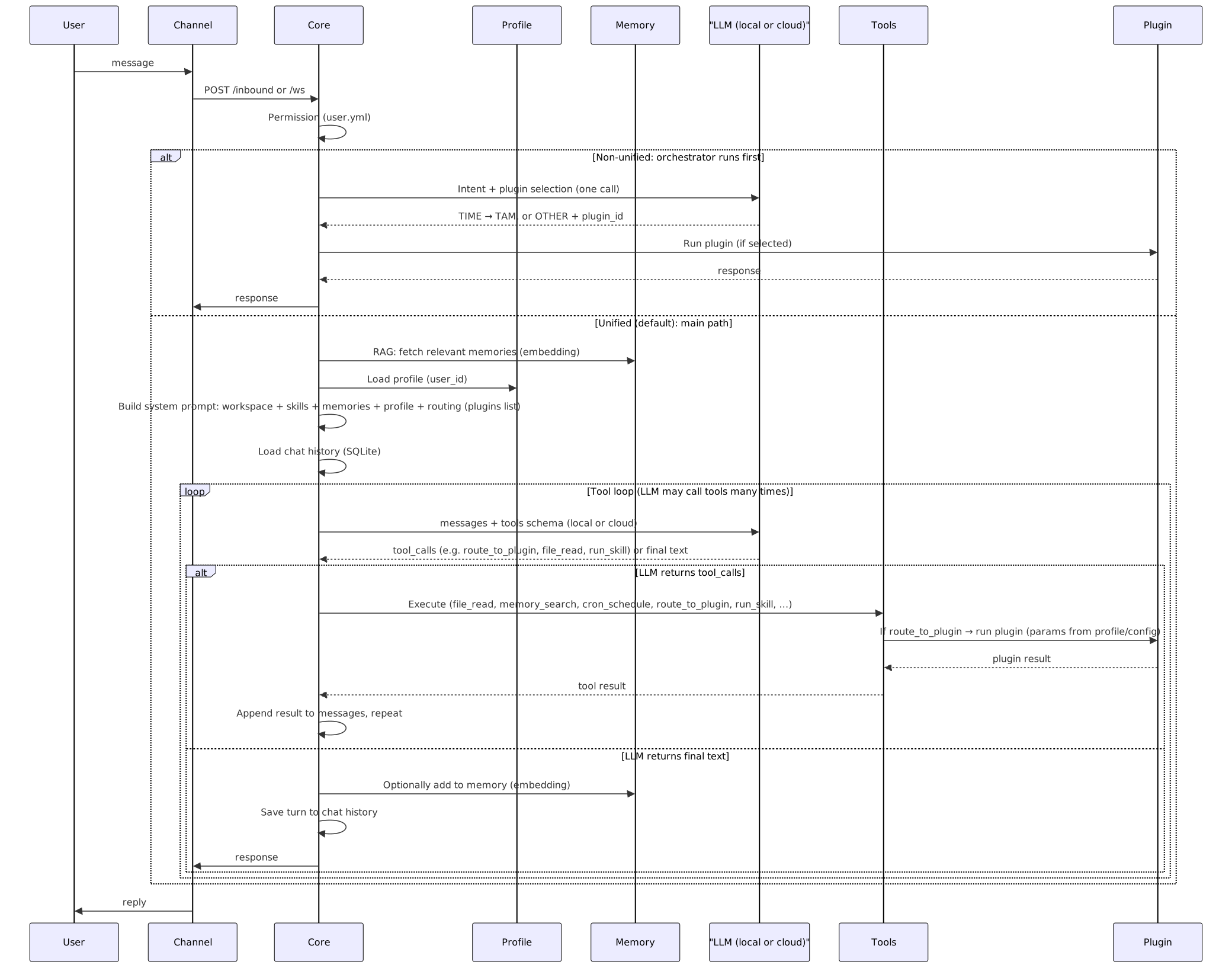
Summary of what the diagram shows
| Aspect | Where it appears |
|---|---|
| LLM: local or cloud | LLM Layer in the first diagram; LLM (local or cloud) in the sequence. Core calls one OpenAI-compatible API; that API is served by local (llama.cpp, GGUF) or cloud (LiteLLM → OpenAI, Gemini, DeepSeek, etc.). Main and embedding model can each be local or cloud. |
| Memory system | Memory subgraph: vector store (Cognee or Chroma), chat history (SQLite), optional knowledge base. RAG: embedding model vectorizes query and memories; relevant chunks are fetched and injected into the system prompt. |
| Profile learning | Profile subgraph: per-user JSON (e.g. database/profiles/<user_id>.json). Loaded each request and injected as "About the user" in the prompt. Used for personalization and for plugin parameter resolution (profile_key). |
| Tools / skills / plugin selection | Context includes: workspace (TOOLS.md), skills block (list of skills from SKILL.md), routing block (list of plugins + “choose one: time tools, route_to_tam, route_to_plugin, run_skill, or other tools”). Tool registry holds all tools (file_read, memory_search, route_to_plugin, run_skill, …). The LLM sees this context and chooses which tool to call (or to reply with text). So selection is done by the LLM given the prompt and tool schemas; no separate “selector” service. |
- Channels — Email, Matrix, Tinode, WeChat, WhatsApp, Telegram, Discord, Slack, WebChat, webhook, Google Chat, Signal, iMessage, Teams, Zalo, Feishu, DingTalk, BlueBubbles. Each channel connects to Core via HTTP (
/inbound,/process) or WebSocket (/ws). See Channels. - Core — Single FastAPI app: permission check (
config/user.yml), orchestrator (intent TIME vs OTHER; plugin selection), TAM (reminders, cron), tool execution (file, memory, web search, browser, cron,route_to_plugin,run_skill), plugin invocation, and chat + RAG. Config:config/core.yml. - LLM layer — One OpenAI-compatible API used by Core. Filled by cloud models (LiteLLM: OpenAI, Google Gemini, DeepSeek, Anthropic, Groq, Mistral, etc.) and/or local models (llama.cpp server, GGUF). Main and embedding model can be chosen independently; cloud and local can work together for better capability and cost. See
config/core.yml(cloud_models,local_models,main_llm,embedding_llm). - Memory — Cognee (default) or in-house Chroma backend: vector + relational + optional graph. Used for RAG and chat history. See
docs_design/MemoryAndDatabase.md. - Profile — Per-user JSON store (e.g.
database/profiles/). Loaded each request and injected as “About the user” in the prompt; used for personalization and plugin parameter resolution. Seedocs_design/UserProfileDesign.md. - Plugins — Built-in (Python in
plugins/) and external (HTTP, any language). Core routes user intent to a plugin (e.g. Weather, News, Mail) when the request matches. See Tools. - Skills — Folders under
skills/withSKILL.md(name, description, workflow). The LLM uses tools to accomplish skill workflows; optionalrun_skillruns scripts. See Tools.
Get started
| Install | Clone, pip install, optional local/cloud LLM setup |
| Run | Start Core and a channel (WebChat, Telegram, CLI, Companion app, …) |
| Channels | WhatsApp, Telegram, email, WebHook, and how to allow users |
| Tools | Built-in tools, plugins, and skills |
| Models | Cloud (LiteLLM) and local (llama.cpp); multimodal (Gemini, etc.); both can work together |
| Platform | Config files, multi-user, memory backend |
| Remote access | Tailscale and Cloudflare Tunnel to reach Core from anywhere |
| Companion vs Channels | How the Companion app and channels differ; how Core handles them |
| Per-user sandbox and file links | Per-user workspace, output folder, and generate link for reports/files |
| Friends plugin | Companion persona (Friend chat); how to use from Companion and WebChat |
| Help | Doctor, troubleshooting, and repo docs |
More
- Introducing HomeClaw — What it is: companion app, memory, plugins (any language), OpenClaw skillset, multi-agent, cloud & multimodal
- Story — Why and how HomeClaw was built
One sentence
HomeClaw supports cloud and local LLMs (or both together for better capability and cost), multi-user, memory-based (RAG + agent memory), and self-hosted. A Flutter companion app (Mac, Win, iPhone, Android) and external plugins (any language) make it extensible and easy to use. Multimodal (local + Gemini) and multi-agent (multi-instance) supported. One agent, one memory, many channels—your home, your AI, your control.